
If you already use a booking system, you don't need to switch to let guests choose their dishes in advance. Your own system stays your booking system. Waste Warrior picks up the bookings, sends your guests a link to pass on their menu choice and lists the choices for your kitchen. This article covers what happens automatically, what you keep doing in your own system and what to look out for.
Which systems it works with
Waste Warrior connects to any booking system that has an API, and most modern systems do. The connection with Formitable is already running. For other systems, we build it when you start with us. Not sure whether your system has an API? Email us the name of your system. We'll find out.
If you don't use a booking system, you use Waste Warrior's own booking button. That's covered in Setting up reservations with menu choice in advance: step by step.
What happens automatically
The connection runs from your booking system to Waste Warrior. That way, your own system stays the source. There's nothing to configure in the app, because Waste Warrior sets up the connection for you.
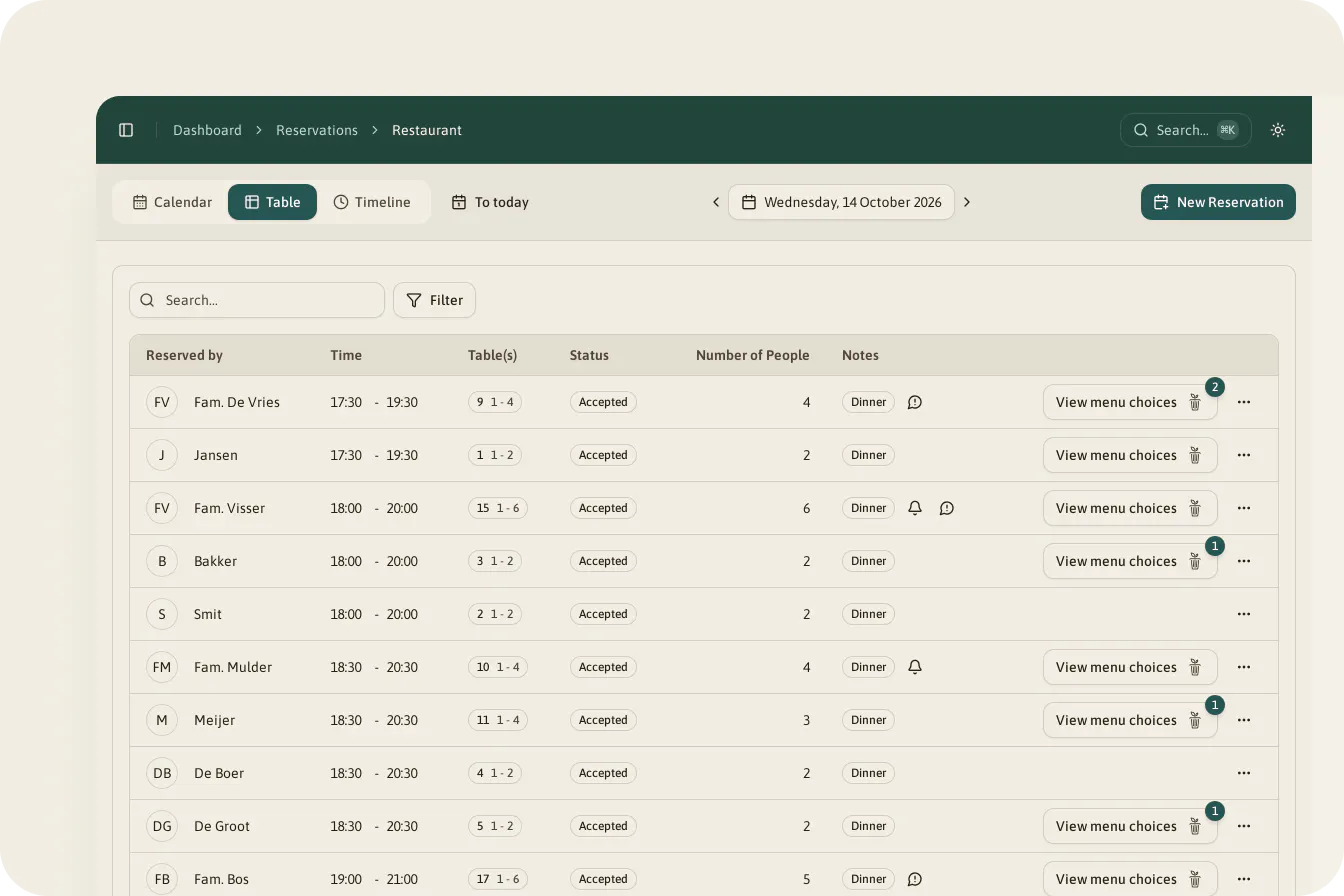
- New bookings come in automatically. With name, party size, date and time, phone number and email address.
- Changes come across. If you move the time or party size in your booking system, or change the phone number, you'll see it in Waste Warrior too.
- Cancellations come across. If you cancel a booking in your booking system, it disappears from Waste Warrior. The menu choices for that table go with it, so your kitchen totals are right again.
You'll find the bookings in Waste Warrior in the "Calendar" and "Table" views.
What you keep doing in your booking system
Your own system stays the place where you manage bookings. In practice:
- Confirmations and cancellation messages. Your booking system sends them, as you're used to. Waste Warrior doesn't send its own confirmation for connected bookings, nor a message when they change or are cancelled. So your guest doesn't get anything twice.
- Your table plan. You assign tables in your booking system.
- Changing and cancelling. Do it in your booking system. That keeps both systems in step.
- Your booking button. The button on your website stays your own system's.
You read the comments a guest leaves when booking, such as an allergy, in your booking system. On the menu choice page, each guest can also fill in "Comments" themselves. You'll see those in Waste Warrior.
What Waste Warrior adds
On top of your bookings, you get menu choice in advance:
- A personal link. Shortly after booking, the guest gets a WhatsApp message or email with a link to choose their dishes. No app or account needed.
- One link for the whole table. With "Share via WhatsApp" or "Copy link", the guest passes it on. Everyone chooses for themselves.
- A reminder. If the booking was made more than 30 hours ahead and not everyone has chosen yet, a reminder follows 24 hours before. Once everyone has chosen, a thank-you follows.
- A deadline. By default, guests choose until 13:00 on the day itself. You change that under "Deadline voor gasten" (guest deadline).
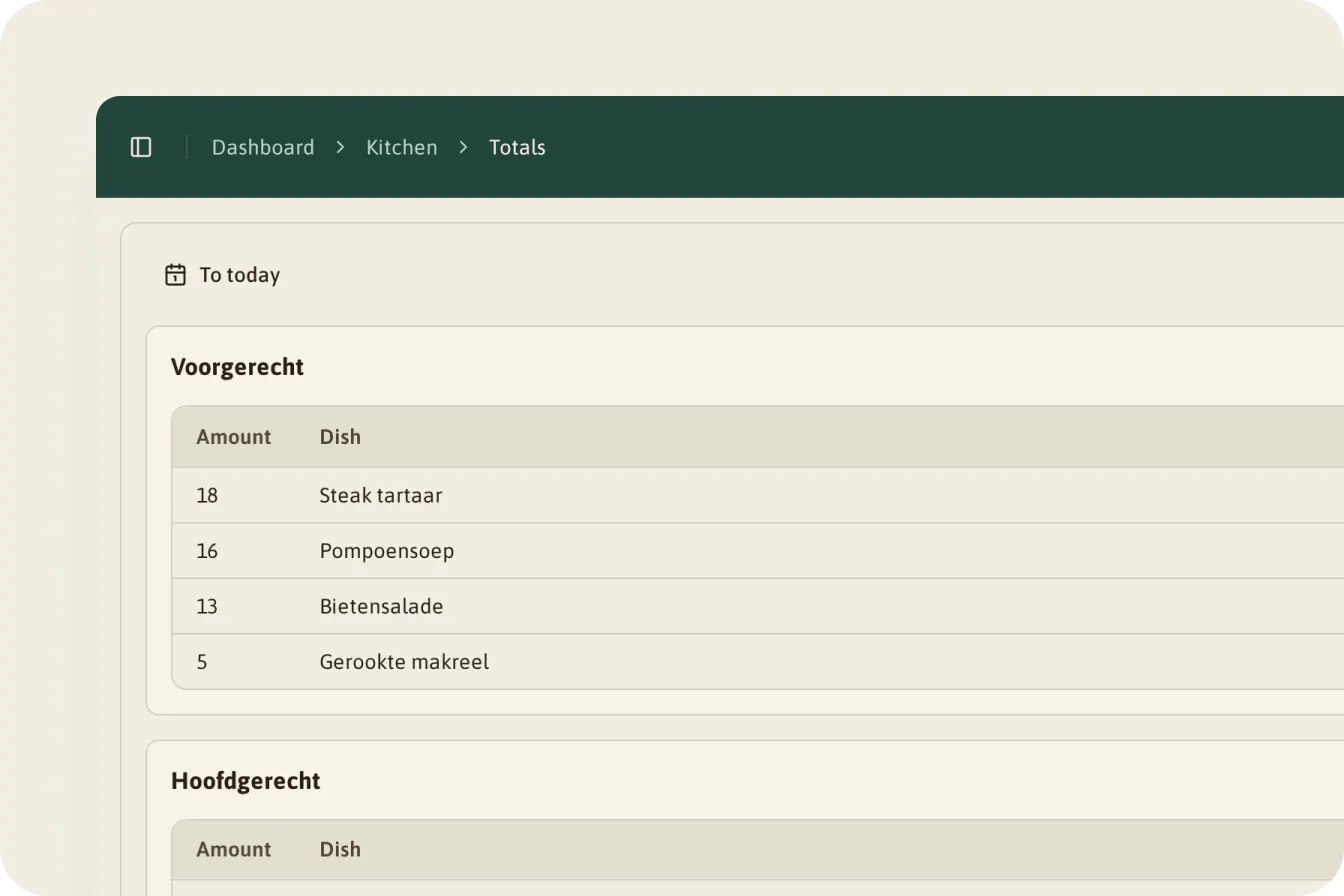
- The kitchen totals. Under "Keuken" → "Totalen" (Kitchen → Totals), you see per course how many of each dish are coming. Per booking, "Reacties inzien" (view responses) shows who chose what.
- Statistics. The "Menu-keuzes" (menu choices) block on your "Dashboard" shows how many guests respond and which dishes are popular.
You build the menu for menu choice in Waste Warrior, under "Keuken" → "Menus". That's also where you set the 14 EU allergens per dish. How to handle allergens and dietary needs well is covered in Allergens and dietary needs in hospitality: rules and practice.
Why does this matter for your kitchen? Your booking system tells you how many guests are coming. Waste Warrior also tells you what they want to eat. Without that second number, you prepare a margin of every dish, just in case. With your guests' choices, you see which way it's going, and that margin shrinks. It stays a preference, not an order: at the table, a guest can still change their mind.
Which bookings don't get a WhatsApp message
Not every booking gets a WhatsApp message. That comes down to a few fixed rules:
- Not a dinner. Only dinner bookings get a WhatsApp message.
- No phone number. No number, no WhatsApp.
- Too short notice. Anyone who books less than 15 minutes ahead no longer gets a WhatsApp message.
- Bookings through certain external channels. Some channels your booking system passes on don't get a WhatsApp message.
If the booking has an email address, the guest gets the link by email in those cases. And if your restaurant isn't live yet, no messages go out at all.
How to set it up
- Let us make the connection. Tell us which booking system you use. Sometimes we'll ask you to give us access there, for example with an API key. Apart from that, there's nothing to configure.
- Build your menu. Go to "Keuken" → "Menus", create courses and dishes and make the menu active.
- Choose your deadline and reward. Under "Instellingen" → "Reserveringen" → "Berichtgeving" (Settings → Reservations → Messaging), set the "Deadline voor gasten" and the text under "Gewenste korting" (desired discount).
- Choose your channels. Agree with us whether you use email, WhatsApp or both, and in which order. On request, we add another channel, for example Signal.
- Test it. Make a booking in your booking system in your own name, with your own number and email address. Check that it comes in, choose a dish and find it in "Totalen". Then cancel it in your booking system and check that it disappears.
Everyday tips
- Only make changes in your booking system. A change in Waste Warrior doesn't go back, and the next change in your own system can overwrite it.
- For phone bookings, ask for a mobile number and an email address. Then that guest gets the link too.
- Check "Totalen" after the deadline. That's your list for mise en place. For guests who didn't choose, prepare as you always do.
- Read two places for allergies. The comments in your booking system, and the per-person "Comments" under "Reacties inzien".
When you guess, you cook extra to be safe. When you ask, you don't have to guess. Where your waste is biggest is covered in Measuring food waste in hospitality: what it costs and where to start.
Questions we often hear about integrations
My system isn't listed. Can it still work? If your system has an API, we can connect it. Email us the name of your system and we'll find out.
Will my guest get two confirmations? No. The confirmation comes from your booking system. From Waste Warrior, the guest only gets the message with the menu link, a reminder if needed and a thank-you once the whole table has chosen.
What happens to the choices if a guest cancels? If the guest cancels in your booking system, or you do, the booking disappears from Waste Warrior, along with the choices. Your totals are right again straight away.
What if the party size changes? Change it in your booking system. The new number comes across to Waste Warrior. Choices already made stay. If someone joins, they choose through the same link.
Can I enter a phone booking in Waste Warrior too? Better to put it in your booking system. Then it's in both systems and the guest gets the menu link as usual.
Do I need to set anything up for the connection? No. Waste Warrior makes the connection. You build the menu and choose your deadline.
More short answers are in the frequently asked questions about integrations.
How Waste Warrior Reservations helps if you already have a booking system
With Waste Warrior Reservations, nothing changes in how your guests book. They book through your own system, as always. The booking reaches Waste Warrior automatically, and the guest gets one message with a personal link, by WhatsApp or email.
At the deadline, your kitchen sees per course how many of each dish are coming, with the comments alongside. So you prepare what's needed, and no more. No hardware, no fixed price: you start with a pilot at one location.
Curious how that works with your booking system? Book a demo and we'll go through it together.